Basketball Legends script: Auto Green, Far Shots, High Contested Shots
Basketball Legends script: Auto Green, Far Shots, High Contested Shots
- Author
- Wwordpress-importPublished by
- Access
- NO KEY
- Published
- Updated
- Views
- 0 views
Script Description
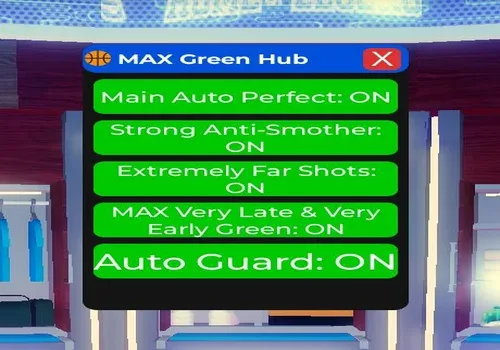
Basketball Legends script adds powerful shooting enhancements for easier scoring in fast 5v5 matches and pickup games. With Auto Green, players can improve shot timing automatically and make cleaner releases without needing perfect manual accuracy. The script also supports extremely far shots and h
Basketball Legends script adds powerful shooting enhancements for easier scoring in fast 5v5 matches and pickup games. With Auto Green, players can improve shot timing automatically and make cleaner releases without needing perfect manual accuracy. The script also supports extremely far shots and high contested shots, allowing you to score from longer distances and perform better even when defenders are close. These features are designed to make shooting more consistent, aggressive, and effective during every match.
Basketball Legends script adds powerful shooting enhancements for easier scoring in fast 5v5 matches and pickup games. With Auto Green, players can improve shot timing automatically and make cleaner releases without needing perfect manual accuracy. The script also supports extremely far shots and high contested shots, allowing you to score from longer distances and perform better even when defenders are close. These features are designed to make shooting more consistent, aggressive, and effective during every match.
Script Functions
3 functions- Auto green
- extremely far shots
- high contesteds
Script Code
284 lines · 10.28 KB · LuaReview before running. Use scripts responsibly.
-- Basketball Legends - MAX Very Late/Early Green + Anti-Smother + Auto Guard (Scrollable GUI)-- Mobile Friendly - No Hitbox Extenderlocal Players = game:GetService("Players")local UserInputService = game:GetService("UserInputService")local TweenService = game:GetService("TweenService")local RunService = game:GetService("RunService")local player = Players.LocalPlayer-- Settingslocal enabled = truelocal antiSmother = truelocal farShots = truelocal maxVeryLateEarly = truelocal autoGuardEnabled = truelocal perfectValue = 1.30-- ScreenGuilocal screenGui = Instance.new("ScreenGui")screenGui.Name = "LegendsMaxGreenHub"screenGui.ResetOnSpawn = falsescreenGui.Parent = player:WaitForChild("PlayerGui")-- Main Framelocal mainFrame = Instance.new("Frame")mainFrame.Size = UDim2.new(0, 300, 0, 420)mainFrame.Position = UDim2.new(0.5, -150, 0.1, 0)mainFrame.BackgroundColor3 = Color3.fromRGB(20, 20, 20)mainFrame.BorderSizePixel = 0mainFrame.Visible = truemainFrame.Parent = screenGuilocal corner = Instance.new("UICorner")corner.CornerRadius = UDim.new(0, 14)corner.Parent = mainFrame-- Title Barlocal titleBar = Instance.new("Frame")titleBar.Size = UDim2.new(1, 0, 0, 45)titleBar.BackgroundColor3 = Color3.fromRGB(0, 80, 220)titleBar.Parent = mainFramelocal titleCorner = Instance.new("UICorner")titleCorner.CornerRadius = UDim.new(0, 14)titleCorner.Parent = titleBarlocal titleLabel = Instance.new("TextLabel")titleLabel.Size = UDim2.new(1, -90, 1, 0)titleLabel.BackgroundTransparency = 1titleLabel.Text = "🏀 MAX Green Hub"titleLabel.TextColor3 = Color3.new(1, 1, 1)titleLabel.TextScaled = truetitleLabel.Font = Enum.Font.GothamBoldtitleLabel.Parent = titleBarlocal closeBtn = Instance.new("TextButton")closeBtn.Size = UDim2.new(0, 35, 0, 35)closeBtn.Position = UDim2.new(1, -42, 0.5, -17.5)closeBtn.BackgroundColor3 = Color3.fromRGB(220, 50, 50)closeBtn.Text = "X"closeBtn.TextColor3 = Color3.new(1, 1, 1)closeBtn.TextScaled = truecloseBtn.Parent = titleBarlocal closeCorner = Instance.new("UICorner")closeCorner.CornerRadius = UDim.new(0, 8)closeCorner.Parent = closeBtn-- Scrollable Arealocal scrolling = Instance.new("ScrollingFrame")scrolling.Size = UDim2.new(1, -20, 1, -70)scrolling.Position = UDim2.new(0, 10, 0, 55)scrolling.BackgroundTransparency = 1scrolling.ScrollBarThickness = 8scrolling.ScrollBarImageColor3 = Color3.fromRGB(0, 120, 255)scrolling.Parent = mainFramelocal listLayout = Instance.new("UIListLayout")listLayout.Padding = UDim.new(0, 10)listLayout.SortOrder = Enum.SortOrder.LayoutOrderlistLayout.Parent = scrolling-- Floating Toggle Buttonlocal toggleUIButton = Instance.new("TextButton")toggleUIButton.Size = UDim2.new(0, 130, 0, 50)toggleUIButton.Position = UDim2.new(1, -150, 0, 30)toggleUIButton.BackgroundColor3 = Color3.fromRGB(0, 120, 255)toggleUIButton.Text = "Toggle UI"toggleUIButton.TextColor3 = Color3.new(1, 1, 1)toggleUIButton.TextScaled = truetoggleUIButton.Font = Enum.Font.GothamBoldtoggleUIButton.Parent = screenGuilocal toggleCorner = Instance.new("UICorner")toggleCorner.CornerRadius = UDim.new(0, 12)toggleCorner.Parent = toggleUIButton-- Create Toggle Functionlocal function createToggle(txt, default, callback) local btn = Instance.new("TextButton") btn.Size = UDim2.new(1, 0, 0, 55) btn.BackgroundColor3 = default and Color3.fromRGB(0, 200, 0) or Color3.fromRGB(200, 0, 0) btn.Text = txt .. ": " .. (default and "ON" or "OFF") btn.TextColor3 = Color3.new(1, 1, 1) btn.TextScaled = true btn.Font = Enum.Font.GothamSemibold btn.Parent = scrolling local c = Instance.new("UICorner") c.CornerRadius = UDim.new(0, 10) c.Parent = btn btn.MouseButton1Click:Connect(function() default = not default btn.Text = txt .. ": " .. (default and "ON" or "OFF") btn.BackgroundColor3 = default and Color3.fromRGB(0, 200, 0) or Color3.fromRGB(200, 0, 0) if callback then callback(default) end end)end-- TogglescreateToggle("Main Auto Perfect", enabled, function(v) enabled = v end)createToggle("Strong Anti-Smother", antiSmother, function(v) antiSmother = v end)createToggle("Extremely Far Shots", farShots, function(v) farShots = v end)createToggle("MAX Very Late & Very Early Green", maxVeryLateEarly, function(v) maxVeryLateEarly = v end)createToggle("Auto Guard", autoGuardEnabled, function(v) autoGuardEnabled = v end)-- Update Canvas SizelistLayout:GetPropertyChangedSignal("AbsoluteContentSize"):Connect(function() scrolling.CanvasSize = UDim2.new(0, 0, 0, listLayout.AbsoluteContentSize.Y + 30)end)-- Draggable Main Framelocal mainDragging = falselocal mainDragStart, mainStartPostitleBar.InputBegan:Connect(function(input) if input.UserInputType == Enum.UserInputType.MouseButton1 or input.UserInputType == Enum.UserInputType.Touch then mainDragging = true mainDragStart = input.Position mainStartPos = mainFrame.Position endend)UserInputService.InputChanged:Connect(function(input) if mainDragging and (input.UserInputType == Enum.UserInputType.MouseMovement or input.UserInputType == Enum.UserInputType.Touch) then local delta = input.Position - mainDragStart mainFrame.Position = UDim2.new(mainStartPos.X.Scale, mainStartPos.X.Offset + delta.X, mainStartPos.Y.Scale, mainStartPos.Y.Offset + delta.Y) endend)UserInputService.InputEnded:Connect(function(input) if input.UserInputType == Enum.UserInputType.MouseButton1 or input.UserInputType == Enum.UserInputType.Touch then mainDragging = false endend)-- Draggable Toggle Buttonlocal toggleDragging = falselocal toggleDragStart, toggleStartPostoggleUIButton.InputBegan:Connect(function(input) if input.UserInputType == Enum.UserInputType.MouseButton1 or input.UserInputType == Enum.UserInputType.Touch then toggleDragging = true toggleDragStart = input.Position toggleStartPos = toggleUIButton.Position endend)UserInputService.InputChanged:Connect(function(input) if toggleDragging and (input.UserInputType == Enum.UserInputType.MouseMovement or input.UserInputType == Enum.UserInputType.Touch) then local delta = input.Position - toggleDragStart toggleUIButton.Position = UDim2.new(toggleStartPos.X.Scale, toggleStartPos.X.Offset + delta.X, toggleStartPos.Y.Scale, toggleStartPos.Y.Offset + delta.Y) endend)UserInputService.InputEnded:Connect(function(input) if input.UserInputType == Enum.UserInputType.MouseButton1 or input.UserInputType == Enum.UserInputType.Touch then toggleDragging = false endend)-- Toggle Main GUIlocal function toggleMainUI() mainFrame.Visible = not mainFrame.VisibleendcloseBtn.MouseButton1Click:Connect(toggleMainUI)toggleUIButton.MouseButton1Click:Connect(toggleMainUI)-- ==================== MAX GREEN FORCING ====================local function forcePerfectShot() if not enabled then return end -- Force meter bar local pgui = player.PlayerGui local visual = pgui:FindFirstChild("Visual") or pgui:FindFirstChildWhichIsA("ScreenGui") if visual then local shooting = visual:FindFirstChild("Shooting") if shooting then local bar = shooting:FindFirstChild("Bar") or shooting:FindFirstChild("Meter") if bar and bar:IsA("Frame") then bar.Size = UDim2.fromScale(1, 1) TweenService:Create(bar, TweenInfo.new(0.005), {Size = UDim2.fromScale(1, 1)}):Play() end end end pcall(function() local char = player.Character if char then for _, obj in pairs(char:GetDescendants()) do local n = obj.Name:lower() if n:find("contest") or n:find("smother") or n:find("shot") or n:find("meter") or n:find("release") or n:find("range") or n:find("quality") or n:find("perfect") or n:find("great") or n:find("late") or n:find("early") then if obj:IsA("NumberValue") or obj:IsA("IntValue") or obj:IsA("FloatValue") then obj.Value = perfectValue elseif obj:IsA("BindableEvent") then obj:Fire(perfectValue) end end end end end)endRunService.Heartbeat:Connect(forcePerfectShot)-- Strong burst on shoot tap (best for very late/early)UserInputService.InputBegan:Connect(function(input) if enabled and (input.UserInputType == Enum.UserInputType.MouseButton1 or input.UserInputType == Enum.UserInputType.Touch) then for i = 1, 8 do task.spawn(function() task.wait(0.002 * i) forcePerfectShot() end) end endend)-- ==================== AUTO GUARD ====================local guardConnectionlocal function startAutoGuard() if guardConnection then guardConnection:Disconnect() end guardConnection = RunService.Heartbeat:Connect(function() if not autoGuardEnabled then return end local myChar = player.Character if not myChar or not myChar:FindFirstChild("HumanoidRootPart") then return end local myRoot = myChar.HumanoidRootPart local closest, minDist = nil, math.huge for _, plr in ipairs(Players:GetPlayers()) do if plr ~= player and plr.Character then local root = plr.Character:FindFirstChild("HumanoidRootPart") if root then local hasBall = plr.Character:FindFirstChild("Basketball") or plr.Character:FindFirstChildWhichIsA("Tool") if hasBall then local dist = (myRoot.Position - root.Position).Magnitude if dist < minDist and dist < 60 then minDist = dist closest = root end end end end end if closest then local dir = (closest.Position - myRoot.Position).Unit myRoot.CFrame = CFrame.lookAt(myRoot.Position, myRoot.Position + dir) end end)endstartAutoGuard()print("🏀 MAX Green Scrollable Hub Loaded!")print("Scroll up/down inside the menu on mobile.")print("Use the blue 'Toggle UI' button to open/close.")Change Log
Updates from the script author will appear here after edits are published.
More 🏀Basketball Legends🏀 scripts
Open place hubNo related scripts yet
Other scripts for this place will appear here when they are published.
Comments
…