1
2local ScreenGui = Instance.new("ScreenGui")
3local MainFrame = Instance.new("Frame")
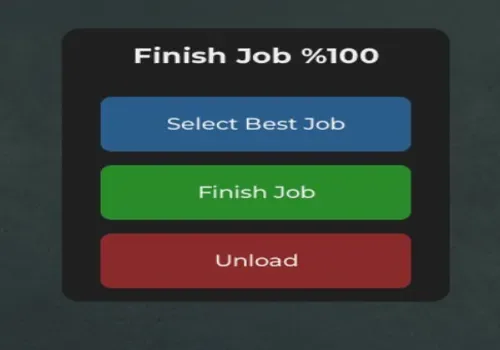
4local Title = Instance.new("TextLabel")
5local SelectButton = Instance.new("TextButton")
6local FinishButton = Instance.new("TextButton")
7local UnloadButton = Instance.new("TextButton")
8
9
10ScreenGui.Name = "JobControlGUI"
11ScreenGui.Parent = game:GetService("Players").LocalPlayer:WaitForChild("PlayerGui")
12ScreenGui.ResetOnSpawn = false
13
14MainFrame.Name = "MainFrame"
15MainFrame.Parent = ScreenGui
16MainFrame.BackgroundColor3 = Color3.fromRGB(35, 35, 35)
17MainFrame.Position = UDim2.new(0.5, -100, 0.5, -100)
18MainFrame.Size = UDim2.new(0, 200, 0, 200)
19MainFrame.Active = true
20MainFrame.Draggable = true
21
22local MainCorner = Instance.new("UICorner", MainFrame)
23MainCorner.CornerRadius = UDim.new(0, 10)
24
25
26Title.Name = "Title"
27Title.Parent = MainFrame
28Title.BackgroundTransparency = 1
29Title.Size = UDim2.new(1, 0, 0, 40)
30Title.Font = Enum.Font.GothamBold
31Title.Text = "Finish Job %100"
32Title.TextColor3 = Color3.fromRGB(255, 255, 255)
33Title.TextSize = 18
34
35
36SelectButton.Name = "SelectButton"
37SelectButton.Parent = MainFrame
38SelectButton.BackgroundColor3 = Color3.fromRGB(45, 100, 150)
39SelectButton.Position = UDim2.new(0.1, 0, 0.25, 0)
40SelectButton.Size = UDim2.new(0.8, 0, 0.2, 0)
41SelectButton.Font = Enum.Font.GothamSemibold
42SelectButton.Text = "Select Job"
43SelectButton.TextColor3 = Color3.fromRGB(255, 255, 255)
44SelectButton.TextSize = 14
45Instance.new("UICorner", SelectButton).CornerRadius = UDim.new(0, 6)
46
47
48FinishButton.Name = "FinishButton"
49FinishButton.Parent = MainFrame
50FinishButton.BackgroundColor3 = Color3.fromRGB(45, 150, 45)
51FinishButton.Position = UDim2.new(0.1, 0, 0.5, 0)
52FinishButton.Size = UDim2.new(0.8, 0, 0.2, 0)
53FinishButton.Font = Enum.Font.GothamSemibold
54FinishButton.Text = "Finish Job"
55FinishButton.TextColor3 = Color3.fromRGB(255, 255, 255)
56FinishButton.TextSize = 14
57Instance.new("UICorner", FinishButton).CornerRadius = UDim.new(0, 6)
58
59
60UnloadButton.Name = "UnloadButton"
61UnloadButton.Parent = MainFrame
62UnloadButton.BackgroundColor3 = Color3.fromRGB(150, 45, 45)
63UnloadButton.Position = UDim2.new(0.1, 0, 0.75, 0)
64UnloadButton.Size = UDim2.new(0.8, 0, 0.2, 0)
65UnloadButton.Font = Enum.Font.GothamSemibold
66UnloadButton.Text = "Unload"
67UnloadButton.TextColor3 = Color3.fromRGB(255, 255, 255)
68UnloadButton.TextSize = 14
69Instance.new("UICorner", UnloadButton).CornerRadius = UDim.new(0, 6)
70
71
72
73
74SelectButton.MouseButton1Click:Connect(function()
75 local args = {
76 "Hanger",
77 "Perfect"
78 }
79 local remote = game:GetService("ReplicatedStorage"):WaitForChild("Remotes"):WaitForChild("SelectJob", 5)
80 if remote then
81 remote:FireServer(unpack(args))
82 SelectButton.Text = "Job Selected!"
83 task.wait(1)
84 SelectButton.Text = "Select Best Job"
85 end
86end)
87
88
89FinishButton.MouseButton1Click:Connect(function()
90 local args = {
91 1,
92 25599583
93 }
94 local remote = game:GetService("ReplicatedStorage"):WaitForChild("Remotes"):WaitForChild("RequestJobComplete", 5)
95 if remote then
96 remote:FireServer(unpack(args))
97 FinishButton.Text = "Job Completed!"
98 task.wait(1)
99 FinishButton.Text = "Finish Job"
100 end
101end)
102
103
104UnloadButton.MouseButton1Click:Connect(function()
105 ScreenGui:Destroy()
106end)
Comments
…