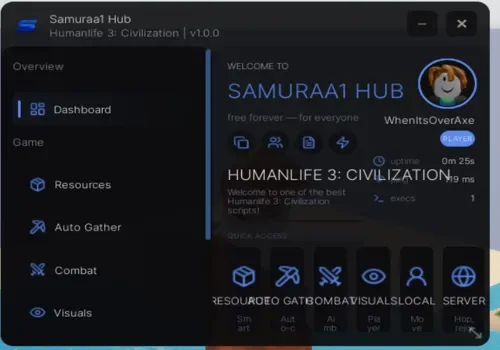
Humanlife 3 Civilization script: by samuraa1

Humanlife 3 Civilization script: by samuraa1
- Author
- Wwordpress-importPublished by
- Access
- NO KEY
- Published
- Updated
- Views
- 0 views
Script Description
Enable Resource ESP - highlights resources through walls Highlight Resources - visually marks resources on screen Show Distance - displays distance to each tracked resource Max Distance / Max Tracked At Once - limits ESP range and item count Resources to Track - select which resource types to hi
Enable Resource ESP - highlights resources through walls Highlight Resources - visually marks resources on screen Show Distance - displays distance to each tracked resource Max Distance / Max Tracked At Once - limits ESP range and item count Resources to Track - select which resource types to highlight Highlight Color - custom color for resource ESP Stats (Total / Tracked / Closest) - shows resource counters Auto Gather - automatically collects nearby resources Auto Gather When Standi...
Enable Resource ESP - highlights resources through walls Highlight Resources - visually marks resources on screen Show Distance - displays distance to each tracked resource Max Distance / Max Tracked At Once - limits ESP range and item count Resources to Track - select which resource types to highlight Highlight Color - custom color for resource ESP Stats (Total / Tracked / Closest) - shows resource counters Auto Gather - automatically collects nearby resources Auto Gather When Standi...
Script Functions
52 functions- Enable Resource ESP - highlights resources through walls
- Highlight Resources - visually marks resources on screen
- Show Distance - displays distance to each tracked resource
- Max Distance / Max Tracked At Once - limits ESP range and item count
- Enable Resource ESP - highlights resources through walls
- Highlight Resources - visually marks resources on screen
- Show Distance - displays distance to each tracked resource
- Max Distance / Max Tracked At Once - limits ESP range and item count
- Resources to Track - select which resource types to highlight
- Highlight Color - custom color for resource ESP
- Stats (Total / Tracked / Closest) - shows resource counters
- Auto Gather - automatically collects nearby resources
- Auto Gather When Standing On Resource - auto-collects when standing directly on resource
- Resources to Collect - select which resource types to auto-gather
- Tween Speed / Gather Distance / Stop Distance - controls movement to resources
- Hits Per Resource / Hit Delay - settings for gathering efficiency
- Anti Fall (Y Lock) - prevents falling off cliffs or into voids
- Status info - shows current auto-gather state
- Enable Aimbot - automatically aims at targets
- Aim Key (Hold / Toggle / Always) - controls aimbot activation method
- Aim Part (Head / UpperTorso / Torso / HumanoidRootPart) - selects which body part to target
- Smoothness / Max Distance - controls aimbot transition speed and range
- FOV Check / FOV Radius - restricts aimbot to field of view circle
- Wall Check / Alive Check / Team Check / Friend Check - filters valid targets
- Show FOV Circle / FOV Color / FOV Follow Mouse - visual aimbot field indicator
- Target Indicator - shows current locked target
- Player ESP - Box ESP / Box color - highlights players with colored outline
- Player ESP - Tracers / Tracer color - draws line from camera to target
- Player ESP - Names / Name color - displays player names
- Player ESP - Distance / Distance color - shows range to target
- Player ESP - Health Bar / Health color - shows health percentage
- ESP Max Distance - limits ESP range
- Players Chams - renders players through walls with glowing effect
- Fullbright - removes darkness and shadows
- No Shadows - disables shadow rendering for performance
- X-Ray - makes walls partially transparent
- FOV Changer - adjusts camera field of view
- Camera Zoom - allows extended camera distance
- Anti AFK - prevents idle kick
- Infinite Jump (keybind V) - allows unlimited jumping
- Fly (keybind F
- speed 20-1000) - free flight with adjustable speed
- Noclip (keybind N) - pass through walls and obstacles
- WalkSpeed (Enable / Keybind C / Method Normal/CFrame / Value 16-500) - custom movement speed
- JumpPower (0-1000) - custom jump height
- Gravity (0-500) - adjusts world gravity
- Server Hop - jumps to another server
- Join Smallest Server - finds and joins least populated server
- Rejoin - leaves and re-enters current server
- Join by JobId - connects to specific server using its ID
- Copy JobId - copies current server ID to clipboard
- Server Info (Players / Memory / PlaceId / FPS) - displays server statistics
- Send Feedback - opens script feedback form
- Auto Execute on Teleport - auto-runs script after teleporting
- Set FPS Cap - limits maximum frame rate
- Unload Script - removes script from memory
- Enable Resource ESP - highlights resources through walls
- Highlight Resources - visually marks resources on screen
- Show Distance - displays distance to each tracked resource
- Max Distance / Max Tracked At Once - limits ESP range and item count
- Resources to Track - select which resource types to highlight
- Highlight Color - custom color for resource ESP
- Stats (Total / Tracked / Closest) - shows resource counters
- Auto Gather - automatically collects nearby resources
- Auto Gather When Standing On Resource - auto-collects when standing directly on resource
- Resources to Collect - select which resource types to auto-gather
- Tween Speed / Gather Distance / Stop Distance - controls movement to resources
- Hits Per Resource / Hit Delay - settings for gathering efficiency
- Anti Fall (Y Lock) - prevents falling off cliffs or into voids
- Status info - shows current auto-gather state
- Enable Aimbot - automatically aims at targets
- Aim Key (Hold / Toggle / Always) - controls aimbot activation method
- Aim Part (Head / UpperTorso / Torso / HumanoidRootPart) - selects which body part to target
- Smoothness / Max Distance - controls aimbot transition speed and range
- FOV Check / FOV Radius - restricts aimbot to field of view circle
- Wall Check / Alive Check / Team Check / Friend Check - filters valid targets
- Show FOV Circle / FOV Color / FOV Follow Mouse - visual aimbot field indicator
- Target Indicator - shows current locked target
- Player ESP - Box ESP / Box color - highlights players with colored outline
- Player ESP - Tracers / Tracer color - draws line from camera to target
- Player ESP - Names / Name color - displays player names
- Player ESP - Distance / Distance color - shows range to target
- Player ESP - Health Bar / Health color - shows health percentage
- ESP Max Distance - limits ESP range
- Players Chams - renders players through walls with glowing effect
- Fullbright - removes darkness and shadows
- No Shadows - disables shadow rendering for performance
- X-Ray - makes walls partially transparent
- FOV Changer - adjusts camera field of view
- Camera Zoom - allows extended camera distance
- Anti AFK - prevents idle kick
- Infinite Jump (keybind V) - allows unlimited jumping
- Fly (keybind F
- speed 20-1000) - free flight with adjustable speed
- Noclip (keybind N) - pass through walls and obstacles
- WalkSpeed (Enable / Keybind C / Method Normal/CFrame / Value 16-500) - custom movement speed
- JumpPower (0-1000) - custom jump height
- Gravity (0-500) - adjusts world gravity
- Server Hop - jumps to another server
- Join Smallest Server - finds and joins least populated server
- Rejoin - leaves and re-enters current server
- Join by JobId - connects to specific server using its ID
- Copy JobId - copies current server ID to clipboard
- Server Info (Players / Memory / PlaceId / FPS) - displays server statistics
- Send Feedback - opens script feedback form
- Auto Execute on Teleport - auto-runs script after teleporting
- Set FPS Cap - limits maximum frame rate
- Unload Script - removes script from memory
Script Code
1 lines · 112 B · LuaReview before running. Use scripts responsibly.
loadstring(game:HttpGet('https://raw.githubusercontent.com/samuraa1/Samuraa1-Hub/refs/heads/main/Loader.lua'))()Change Log
Updates from the script author will appear here after edits are published.
More Humanlife 3: Civilization scripts
Open place hubNo related scripts yet
Other scripts for this place will appear here when they are published.
Comments
…