Build A Boat For Treasure script: image to block conversion

Build A Boat For Treasure script: image to block conversion
- Author
- Wwordpress-importPublished by
- Access
- NO KEY
- Published
- Updated
- Views
- 0 views
Script Description
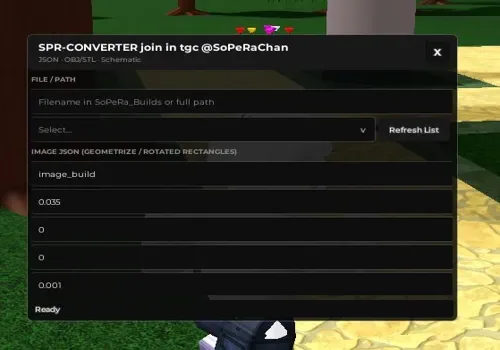
Script functions and what they do Note: This script is for image to block conversion in Build A Boat For Treasure. How to use the script Drop the file into the workspace folder, select it from the list, and find the settings for your file type at the bottom. Scroll down and find the settings for
Script functions and what they do Note: This script is for image to block conversion in Build A Boat For Treasure. How to use the script Drop the file into the workspace folder, select it from the list, and find the settings for your file type at the bottom. Scroll down and find the settings for your file type. To work with images: Go to the Geometrize website. Important: Set the settings exactly as shown in the screenshot. When everything is ready, click Save JSON and drop the file in...
Script Functions
14 functions- Script functions and what they do
- Note: This script is for image to block conversion in Build A Boat For Treasure.
- How to use the script
- Drop the file into the workspace folder
- Script functions and what they do
- Note: This script is for image to block conversion in Build A Boat For Treasure.
- How to use the script
- Drop the file into the workspace folder
- select it from the list
- and find the settings for your file type at the bottom. Scroll down and find the settings for your file type.
- To work with images:
- Go to the Geometrize website.
- Important: Set the settings exactly as shown in the screenshot.
- When everything is ready
- click Save JSON and drop the file into the same workspace folder.
- The Max Shapes Cap setting is your block limit. The higher the value
- the better the detail
- but it also takes a long time to load.
- Script functions and what they do
- Note: This script is for image to block conversion in Build A Boat For Treasure.
- How to use the script
- Drop the file into the workspace folder
- select it from the list
- and find the settings for your file type at the bottom. Scroll down and find the settings for your file type.
- To work with images:
- Go to the Geometrize website.
- Important: Set the settings exactly as shown in the screenshot.
- When everything is ready
- click Save JSON and drop the file into the same workspace folder.
- The Max Shapes Cap setting is your block limit. The higher the value
- the better the detail
- but it also takes a long time to load.
Script Code
1 lines · 117 B · LuaReview before running. Use scripts responsibly.
loadstring(game:HttpGet('https://raw.githubusercontent.com/Pedrinosop/Babft/refs/heads/main/TestConvertOpenBABFT'))()Change Log
Updates from the script author will appear here after edits are published.

Comments
…